Table of contents
Requirements and specifications for the design of XR-based learning workflows
This document addresses the design, development, testing and assessment of learning workflows in industrial engineering education, taking advantage of XR technologies. Each workflow will be formalised in terms of Learning objectives, Use cases, Tasks, User Experience, and Technology.
The workflows will be designed taking into consideration both pedagogical and technical aspects. Thus, the latest research advances in these fields will be exploited to support the design of the workflow steps and pursue the learning objectives.
A particular focus will also be given to digital tools and the XR interaction paradigms. Free and open frameworks and libraries will be considered to enhance the possibility of being adopted by a broader range of users. XR environments’ characteristics and interactions will be designed and assessed considering their use in academic facilities and for autonomous study.
1. Framework for XR-Based Learning Workflows
Virtual and augmented reality (VR/AR) have emerged as significant technology trends in higher education, with the potential to enhance teaching, learning, and research experiences in various disciplines in both higher education, and vocational education and training.
Many universities and colleges have recognized the potential of VR/AR and have started exploring their applications [1]. They have invested in creating VR/AR labs, developing immersive content, and incorporating these technologies into their curricula. The global market for virtual reality in the education market grew from $8.67 billion in 2022 to $11.95 billion in 2023, representing a compound annual growth rate (CAGR) of 37.9% [2].
Nevertheless, the widespread adoption and implementation of AR/VR in higher education may still be in the early stages and can vary across institutions because of several significant challenges involved:
-
Consistent investment in hardware, software, and infrastructure is required, such as high-quality headsets, computing devices, and network capabilities.
-
Accessibility concerns (cost, availability, and physical disabilities) for students need to be addressed.
-
Faculty members need to acquire the necessary skills and knowledge to integrate VR/AR into learning activities, including learning the tools, techniques, and pedagogical approaches involved.
-
The customization of a virtual environment (VE) scene can require significant effort.
-
Developing high-quality VR/AR content that aligns with specific educational objectives can be time-consuming and resource-intensive.
-
Lack of standardized platforms and compatibility across devices.
-
The need for pedagogical redesign and alignment with learning outcomes.
A popular trend in the adoption of VR in education revolves around serious games or gamification, i.e., the exploitation of a game paradigm to implement learning activities. Furthermore, serious games in education have also been acknowledged for potential impact on the sense of achievement, engagement, and motivation of the students. In addition, the intersection of video games and learning approaches led to the development of frameworks supporting the design of serious games.
The Mechanics, Dynamics, and Aesthetics (MDA) framework [3] considers three fundamental design components, i.e., actions, processes, and data that are available in the game (mechanics), run-time behaviour and dynamics of actions (dynamics), and the desirable emotional responses of the player (aesthetics). Focusing on serious games for learning, Winn [4] highlighted the need to extend the MDA framework to consider the contributions of designers and players to building the gaming experience. To this aim, the Design, Play and Experience (DPE) framework was proposed Winn2009, consisting of four main layers (Learning, Storytelling, Gameplay, User Experience) that are instantiated for each of the three main components, namely design, play and experience. In addition, DPE points out the relevant role of the adopted technology in making a serious game effective. More recently, Urgo et al. [5] specialized the DPE framework for designing learning applications in the field of industrial engineering (DPE-IE) within higher education, providing an implementation and demonstration example of the configuration and analysis of a manufacturing system.
The proposed framework for XR-Based Learning Workflows is based on the DPE-IE framework to foster the use of XR in higher education by reducing development time and assisting educators lacking strong expertise in VR and software development. At the core of the framework (Figure 1), adapted from [6], lies the digital model of the Virtual Environment (VE Digital Model) that helps decouple the generation of the case-based contents from the development and configuration of technology-intensive tools.
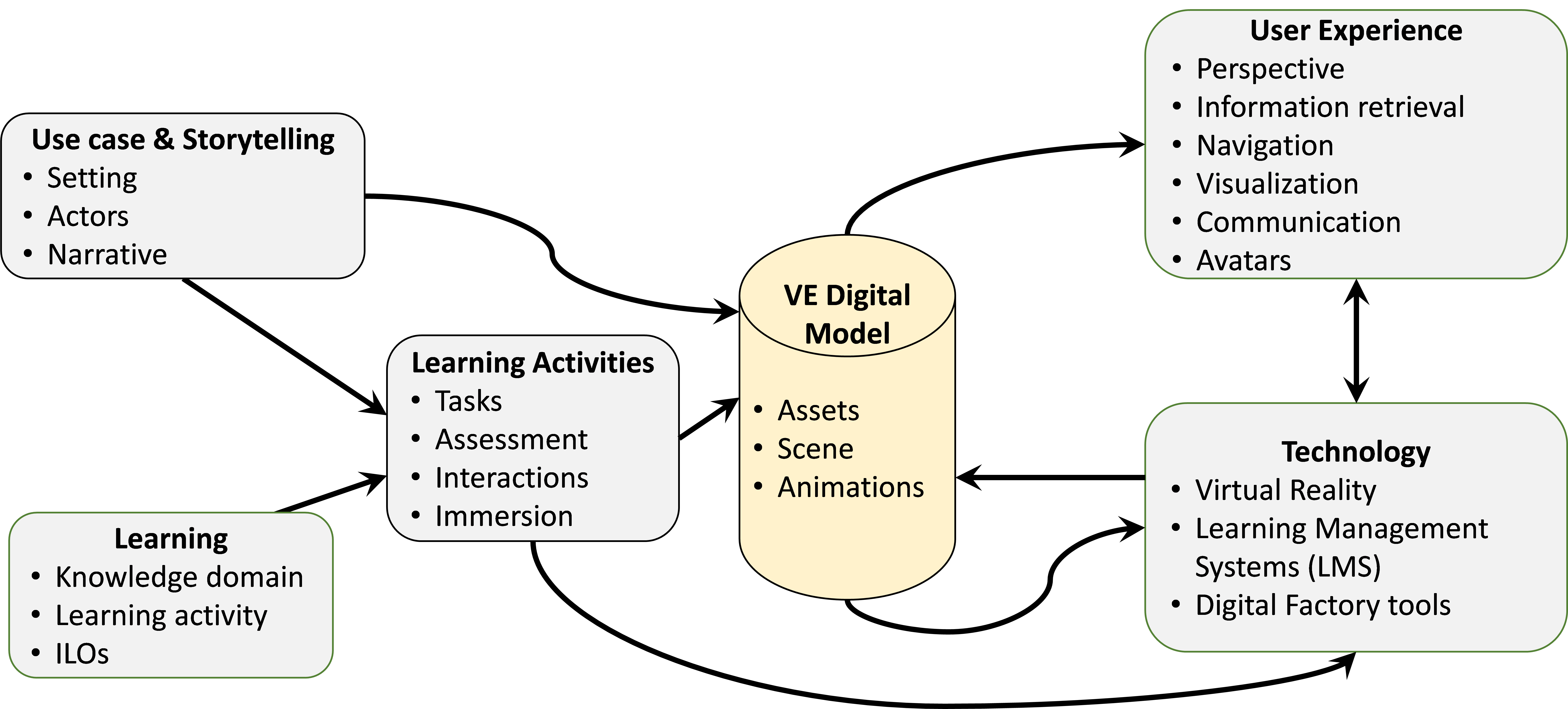
Figure 1: framework for XR-Based Learning Workflows
The objective of the framework is to enable teachers and supervisors to focus on generating learning contents that instantiate the VE digital model, while software experts develop digital tools and data interfaces.
Figure 1 depicts the data flows and the components of the framework:
-
Learning: the definition of the content and pedagogy of learning activities in industrial engineering.
-
Use case & Storytelling: the definition of the stage and story used to convey content that is relevant for the learning goals.
-
Activities: the definition of tasks to be carried out, particularly in the virtual environment, and the related assessment.
-
User Experience: the design of interfaces defining what the student/trainee can see and hear.
-
Technology: specification of the technologies used to implement the Virtual Environment and the related digital tools.
2. Design of XR-Based Learning Workflows
This chapter delves into the main details of the framework, defining the guidelines to design and develop the components and paying attention to the requirements for the virtual environment (VE).
2.1 Learning Objectives Definition
The learning component serves as the foundational element that enables effective and engaging learning experiences in an educational context. It involves defining the kwowledge domain and explicitly list the Intended Learning Outcomes (ILOs) [7] that the students will acquire thorugh the workflow. The ILOs can be grouped according to different classes of knowledge, as defined by [8]:
-
Factual knowledge, i.e. the basic elements that the learners must know to be acquainted with the discipline or problem under study.
-
Conceptual knowledge, i.e. the framing of the basic elements in a theory or a system and their relations.
-
Procedural knowledge, i.e. the capability to do something, e.g. apply an algorithm, a technique, a method, etc.
-
Metacognitive knowledge, i.e. the knowledge of cognition and awareness of one’s own cognition.
The requirements for the VE include:
-
The virtual environment and the interactions must be able to adapt to the specific ILOs.
-
Two types of users can participate in the VE, i.e., student (trainee) and teacher (supervisor). The student is the target of the ILOs, while the teacher facilitates the knowledge acquisition.
2.2 Use Case and Storytelling
The storytelling component encompasses the actors, setting, and narrative that is experienced along the workflow and in the virtual environment (VE). This component must be customized for the selected use case scenario.
The setting can be a real industrial site where the user is an engineering student. The narrative may revolve around the need of analyzing, designing, installing or managing an industrial facility that is represented in a realistic environment. The story will guide the user to explore the game environment in an autonomous way while facing challenges that ask to apply engineering methodologies.
The requirements for the VE include:
-
The VE must give access to a realistic representation of the industrial context, implementing visualization experiences that also represent the dynamics of the system.
-
The VE must provide relevant details such as products, processes, machines, failures, monitoring, etc. This will enable a narrative revolving around the need to analyze, design, install, manage, or maintain industrial products, processes, systems, or facilities.
2.3 Learning Activities
The activities along the workflow must be defined to meet the learning objectives while considering the available technologies. Regarding the XR dimension, it is important to define the mechanics and dynamics of the virtual environment that are designed taking into consideration affective goals such as immersion, intellectual problem-solving, competition, creation, discovery, advancement and completion, application of abilities, and learning.
The activities may be organized in levels with growing complexity according to the type of related knowledge. Each level contributes to reaching specific ILOs and must be associated with an assessment. The initial levels will be mainly aimed at providing fundamental knowledge, while the higher ones build up on the existing knowledge to achieve higher learning objectives. A key issue is balancing the difficulty of the learning activities, i.e. finding the right balance between challenges and the (increasing) abilities of the student/trainee.
The requirements for the VE include:
-
The VE must be able to support the execution of tasks with different characteristics based on the ILOs. In addition, the VE should enable the direct learning assessment or be integrated with a learning assessment tool.
-
Multiple participants in the VE can stimulate collaboration and team working skills and interactions among students.
-
Immersion in the VE must be provided to let the user have a close-to-reality experience, including the simulation/animation of elements involved in industrial processes. For instance, a part is loaded on an assembly station; a workpiece is machined on a lathe; a pallet is moved along a conveyor.
2.4 Technology Selection and Integration
The technology component defines how the workflow must be developed, implemented and integrated with data sources to enable the other components to work correctly.
XR is used to enhance the realism of the experience with reference to industrial scenarios.
The requirements for the VE include:
-
The use of open and multi-platform technologies is recommended to support the democratization of the XR learning workflow in higher education.
-
In addition to XR, other digital tools may be employed and integrated for learning assessment (e.g. Learning Management Systems) and to generate data consumed by the VE (e.g. simulation of industrial processes).
The digital model of the VE plays a central role in the framework because it integrates data from heterogenous sources. An effective VE digital model must be based on a data model that facilitates the generation of new instances (model-driven reconfigurability).
The VE must be stored and shared in format that is easily accessible by digital tools to enhance interoperability. Standard data exchange formats should be used whenever is possible.
2.5 User Experience Design
The user experience plays a critical role in delivering an industry-related experience and aiding in the attainment and evaluation of the intended learning outcomes. To ensure the effectiveness of the virtual environment, it is essential that the level of detail (LoD) of the virtual environment is comparable with the real industrial facility in terms of both quality and dimensions.
The requirements for the VE include:
-
Users may need to retrieve information related to assets in the VE (e.g., ID, description, position, slides, data sheets, 3D files, failure logs of a workstation) through specialized interfaces, such as panels that become visible upon selecting a specific asset.
-
Navigation techniques and metaphors must enable the user to freely discover the (industrial) environment.
-
Messaging via voice or text chat can enhance communication and collaboration.
-
Avatars may play a key role in the virtual environment.
3. Technology for XR Learning Workflows
Digital tools and technologies must be selected based on the specific needs of the learning workflows. Several digital tools, including commercial options, are available in the market, but many of these tools fall short of meeting key requirements due to issues such as costly commercial licenses, cumbersome input/output data exchange management, or excessive complexity.
The digital tools can be used as standalone or in integrated way. The use of an integrated digital platform [9] is recommended because it can better support the execution of learning workflows by smoothly providing access to different tools that exchange data without adding an overhead of data handling tasks that would divert the attention of the students.
The integration of heterogenous digital tools can be supported by a common, extensible data model that represents industrial assets such as production systems, resources, processes, and products. An example of factory data model [9] has been developed as an OWL ontology, as it offers a flexible framework for integrating various knowledge domains while reusing existing technical standards (e.g., Industry Foundation Classes, W3C SSN/SOSA, UML Statechart). More details and examples of the factory data model can be found online in terms of ontology documentation1, serialization in JSON format2, related queries in SPARQL language3.
The remaining part of this chapter is focused on the on the guidelines for the use of XR technology and examples of XR tools.
3.1 XR Overview
3.1.1 Benefits
XR technologies provide several key features that are relevant for a learning experience, such as:
-
Accurate simulation of environments, objects, and phenomena is central to the virtual experience. This involves creating digital worlds that replicate reality or envision imaginative scenarios, offering users a strong sense of presence.
-
Interactivity enables users to engage and respond within the virtual environment, often using input devices such as controllers, sensory gloves, or through gestures and body movements.
-
Multisensory experiences enhance immersion, with high-resolution screens or VR headsets delivering realistic visuals, while ambient audio deepens the sense of presence. Some advanced virtual experiences also incorporate sensory feedback, such as simulated touch through tactile gloves or vibrations, providing a more immersive experience.
-
Social interaction is increasingly important in virtual experiences, allowing users to connect, collaborate, and interact within shared virtual spaces, both for recreational and professional purposes.
The applications of XR in industry are highly promising and can be effectively transferred to academic learning environments. By leveraging XR technologies, students can engage in realistic, immersive training scenarios similar to those used in industrial settings, enabling them to practice complex tasks, operate machinery, and address real-world challenges in a controlled virtual space.
In addition to training, XR can enhance collaborative design, prototyping, and problem-solving within academic curricula. Students can interact with 3D models, facilitating deeper understanding and allowing them to identify potential issues before moving to physical experiments or projects. This technology can also support remote learning and virtual labs, making advanced learning accessible from anywhere.
Lastly, XR offers new ways for students to engage in safety training and hands-on simulations without exposure to real risks, preparing them for professional environments with a higher level of practical experience and awareness.
3.1.2 Challenges
Despite the potential of XR, there are still relevant challenges that limit its spread. The quality of the immersive experience sought significantly impacts the investment and management cost, as a more advanced experience typically demands complex technologies and equipment. Another key element that escalates both cost and complexity is the design, development, and creation of virtual environments. Developing virtual models requires frequent updates and revisions. However, as simulation technologies evolve, constant updates are needed, requiring substantial programming efforts, which can pose challenges for users without programming expertise.
Other challenges in the use of XR, particularly with regard to health, are significant. One of the primary concerns is the potential for users to experience discomfort, such as eye strain, disorientation, and nausea—symptoms commonly associated with motion sickness induced by virtual reality. This discomfort is often caused by a disconnect between the user’s real-world movement and their corresponding movement in the virtual environment, which may be controlled through devices like joysticks. When the physical sensations of motion differ from what is perceived in VR, this sensory mismatch can create a conflict, leading to an unpleasant and disorienting experience for the user.
When using head-mounted displays (HMDs) in XR environments, it is recommended to limit sessions to a maximum of 20 minutes. This helps reduce the likelihood of discomfort, such as eye strain and motion sickness, ensuring a safer and more comfortable experience for users.
3.2 XR Guidelines
XR development guidelines and best practices are essential for ensuring a positive user experience, evolving in step with advancing technology. Despite the ongoing innovations, focusing on user experience quality, performance optimization, and content engagement remains central to the success of XR projects.
Best practices arise from the collective experience of developers and users in the XR domain. They provide tried-and-true methodologies for development, helping avoid common pitfalls, improving efficiency, and enhancing usability. By adhering to these standards, developers can accelerate the development process while delivering applications that meet functional needs and provide a high-quality user experience.
The following guidelines are focused on VR applications4, but most of the rules and recommendations are valid for general XR applications. The guidelines address various aspects, such as optimizing performance, enhancing user comfort, and ensuring security. In addition, these guidelines assist in making informed decisions regarding technology selection, software design, and the implementation of key features, ensuring that the final product is both functional and user-friendly.
3.2.1 Vision
The representation of the virtual world is a crucial component that demands careful consideration and strategic decisions across multiple aspects. These choices impact the overall realism, usability, and immersive quality of the virtual environment, making it essential to focus on elements such as graphics, interaction design, and system performance to ensure a seamless and engaging user experience.
Comfortable Viewing Distances
Visual comfort hinges on two key factors: accommodative demand and vergence demand. Accommodative demand is the eye’s adaptation to focus on different depth planes, while vergence demand refers to the inward rotation of the eyes needed to converge on an object at a specific depth.
In VR, accommodative demand is fixed since images are displayed on a screen at a constant optical distance, but vergence demand changes as the eyes rotate to focus on objects at varying depths. To minimize eye strain, objects likely to be viewed for extended periods (like menus or focal points) should be placed within a comfortable viewing distance of 0.5 to 1 meter. Objects outside this range generally won’t cause discomfort unless prolonged focus is required. Techniques to enhance comfort include blurring the background behind selected menus or objects, simulating natural vision and reducing distractions from the main point of focus.
Displaying Information
Traditional “Heads-Up Displays” (HUDs) overlay visual elements on the virtual environment to provide useful information without disrupting the immersive experience. However, it is generally more effective to integrate information into the environment, as HUDs can introduce practical issues and even become annoying.
In the case of VR, the primary issue with HUDs lies in defining their depth plane. A conflict arises when an object in the scene appears closer to the user than the HUD, as the HUD, due to occlusion, is perceived as closer and obscures elements behind it. This contradiction disrupts the sense of immersion.
A better approach is embedding information into the environment. For example, players could access information by moving their heads or interacting with wearable devices. The key is to present information in a way that is clear, comfortable, and does not interfere with the user’s ability to see and interact with the virtual world.
3.2.2 User input
When it comes to user interaction in virtual environments, controllers can be classified into two main types: mobile device controllers with 3 degrees of freedom (3DOF) and those with positional tracking, offering 6 degrees of freedom (6DOF).
3DOF controllers allow tracking of the device’s orientation but not its position in space. In contrast, 6DOF controllers support both orientation and positional tracking, enabling the use of paired controllers that let users manipulate virtual objects with their hands.
Some general recommendations for user input in VR include maintaining a 1:1 ratio between the controller’s movement in the real world and its virtual representation. Additionally, using a standard button layout, familiar across most VR applications, can enhance usability, even for new users.
3DOF Controllers
When using 3DOF controllers, it is generally advised against representing them as hands or similar objects, as this may mislead users into thinking they can grasp or manipulate items directly. These controllers are effective for pointing and selecting user interface elements.
It is beneficial to visualize the controller within the scene and project a laser beam from it toward the selected element. Keeping the ray pointer active while pointing at objects in VR enhances the interaction.
To distinguish between interactive and non-interactive objects, consider varying the brightness of the beam, making it appear more opaque when aimed at non-interactive items. Additionally, providing a visual cue - such as highlighting or slightly zooming in on an object when the cursor hovers over it - can improve user experience in VR.
6DOF Controllers
While implementing hand registration can be complex and time-consuming, it can significantly enhance user experience by enabling intuitive interaction with the virtual world. For successful integration, users must perceive the virtual hands as accurate representations of their own. This requires precise alignment of the position and orientation of the virtual hands with the user’s real hands.
Realistic hand models can cause discomfort if they do not match the user’s actual hands, so allowing customization of hand appearance can help address this issue. Ethereal or robotic hand models tend to work well, as they adapt credibly to various users.
It is crucial that the intersection between the virtual hands and objects does not disrupt tracking. A common approach is to represent the physical hand colliding with the environment while simultaneously displaying a second set of ethereal or transparent hands. This ensures continuous tracking and visually indicates that the user can’t manipulate objects with these representations.
When it comes to grasping objects in VR, the recommended method is to align the interaction with the object’s intended use. For objects designed with a specific grip, they should automatically align with the hand upon contact. If an object lacks a clear way to be held, it should attach to the hand as soon as the grab trigger is activated. In this case, the object’s orientation can be arbitrary, but maintaining its attachment creates a believable interaction.
3.2.3 User orientation and positional tracking
User orientation and positional tracking are essential components of the virtual experience, particularly in devices that offer six degrees of freedom.
User orientation involves tracking the direction and angle of the user’s head and body within the virtual space, enabling them to look around and perceive their surroundings accurately. In contrast, positional tracking monitors the user’s physical movements in three-dimensional space, allowing for actual movement within the virtual environment, thereby enhancing immersion and interactivity.
It is crucial to avoid disabling or altering positional tracking, especially when users are moving in the real world. Any discrepancies between real-world movement and virtual motion can create a sensory conflict, leading to significant discomfort.
Location tracking can be compromised if the user steps outside the designated viewing area. To ensure a seamless experience, it is essential to establish a defined play area for VR. This area is set up during the initial configuration for each user and works in conjunction with the boundary system to keep users safe.
3.2.4 User well-being during the experience
The overall user experience in virtual reality (VR) necessitates careful consideration of the fundamental interactions between users and the virtual environment. Allowing users to determine the length of their sessions is essential, given the physical nature of VR, where users wear head-mounted devices and often stand or move around.
Developers should recognize the importance of enabling users to take breaks while engaging with content, ensuring they can pause the experience and resume exactly where they left off. Furthermore, incorporating resting positions within the VR experience can help alleviate fatigue during extended play.
It is vital for developers to conduct regular testing of their VR applications, as this not only enhances comfort but also assesses the overall user experience. Testing with a diverse range of users, including novices, is recommended to capture a broad spectrum of reactions and ensure a comfortable experience for all.
Additionally, users should be gradually introduced to the gaming experience, starting with slower, calmer interactions and providing warnings for more intense content, allowing them to mentally prepare.
3.2.5 Locomotion
Locomotion refers to how users navigate virtual worlds and is a critical design feature for any VR application. Providing a comfortable and effective locomotion experience is key to the success of a VR project.
There are two primary types of locomotion, each offering a distinct way of moving users through virtual environments: physical and artificial locomotion.
Physical locomotion mirrors the user’s real-world movements within the virtual space.
Artificial locomotion, on the other hand, allows users to move within the virtual world without corresponding physical movement. Incorporating artificial locomotion is advisable even in systems relying on physical movement, ensuring accessibility for users with limited space or mobility issues.
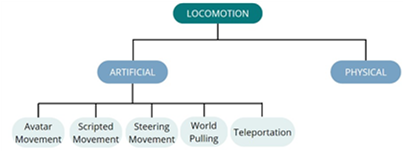
Figure 2: Locomotion types
Artificial Locomotion Types include:
-
Avatar Movement: Users control a character’s movement using a combination of thumbsticks, buttons, visors, or motion controllers. This is the most common form of movement in VR, particularly for navigating first-person environments.
-
Scripted Movement: The virtual camera follows a predefined motion path, automatically guiding the user’s view along a set trajectory.
-
Steering Movement: Users control continuous motion without constant input, similar to driving a vehicle where movement persists based on initial user actions.
-
Teleportation: This type of movement involves an instant shift in the user’s perspective. Its key benefit is eliminating continuous motion, which helps prevent motion sickness, especially for users sensitive to vection. However, teleportion can cause disorientation.
-
World Pulling: Users stay stationary while grabbing a point in the virtual world and either pulling or pushing it. This movement causes the virtual environment to shift accordingly, altering the user’s perspective.
To enable user movement within a virtual world using artificial locomotion, input must be processed effectively. Various techniques are used to control movement within virtual space, including:
-
Direction mapping in VR determines how a user’s movement is aligned with the control stick and the virtual space’s orientation. Allowing users to select their preferred mapping type is crucial for comfort and preventing nausea. Here are some common types of direction mapping:
-
Head-Relative. Movement direction continuously aligns with where the user’s head is facing. Pushing the thumbstick forward moves the avatar in the direction the head is oriented, with the movement direction updating in real-time as the user turns their head.
-
Initial Head-Relative. Movement starts in the direction the user was facing at the time movement began. If the user turns their head while pushing the thumbstick, the direction of movement remains fixed and does not change with head movement.
-
Controller-Relative. Movement is determined by the orientation of the hand controllers. Pushing the thumbstick forward moves the avatar in the direction the controllers are pointing, independent of where the user’s head is facing.
-
Initial Controller-Relative. Movement begins in the direction the controllers are facing when the user first pushes the thumbstick. Turning the controller while moving does not change the direction of movement; the initial orientation is maintained.
-
-
Teleport control. The execution of teleportation in VR typically involves a series of events to ensure that teleportation is intuitive and avoids the motion sickness issues that can arise with continuous artificial locomotion:
-
Activation: The process begins when the user moves the thumbstick from its neutral (central) position, which triggers the appearance of a targeting beam. If the thumbstick is unavailable, teleportation can also be activated using a standard button on the controller.
-
Pointing: Once the targeting beam appears, the user points it toward the desired destination within the virtual world. This step ensures that the user selects where they wish to be transported.
-
Landing Orientation Control (Optional): Some systems allow users to control their landing orientation, meaning they can adjust the direction they will face upon landing at the teleport location.
-
Triggering the Teleport: The teleportation is finalized when the user presses a button or releases the thumbstick to trigger the movement. The user’s perspective instantly shifts to the selected location.
- Motion Tracked Locomotion. In VR, locomotion can be achieved without relying on traditional input methods like controller buttons or thumbsticks by using motion controllers to track posture, hand poses, and physical movements. This approach aims to make movement in the virtual world feel more natural, aligning with how users would act in the real world.
In VR design, the decision of whether the camera should collide with the environment is crucial, as it significantly affects user experience and immersion. Here’s a breakdown of the two options:
-
Cameras without Collision. In this case, the camera is free to move through any objects or obstacles in the virtual world without any interruption. This approach can create smoother experiences, especially when the focus is on exploration or interactions where the environment should not impede the user’s movement. The main advantages of collision-free cameras are: seamless movement, ease of Implementation (no collision detection systems are needed), better use for applications where physical space isn’t supposed to feel like a solid barrier. However, this can break immersion in realistic scenarios, as the user may pass through walls or objects in ways that don’t feel natural.
-
Camera with Collisions. Cameras with collisions involve detecting when the camera intersects with an object in the virtual environment. When this happens, the camera stops, much like a physical body would when encountering an obstacle. This approach can be important for maintaining realism, especially in games or simulations that focus on physical interactions with the world. However, there is a potential for discomfort if the user continues to move in the real world while the camera is blocked in VR, since this discrepancy can cause discomfort, disorientation, sensory confusion or even motion sickness. Finally, camera collisions require more sophisticated coding, with precise calculations and testing to ensure that the experience remains fluid while respecting the physical constraints of the environment.
As a summary, the following table presents potential issues related to VR locomotion and the types of locomotion that may trigger them.
| Issue | Description | Triggered by Locomotion Types |
|---|---|---|
| Motion Sickness (Vection) | Caused by a mismatch between visual movement and lack of corresponding physical movement, leading to nausea. | Artificial locomotion (Avatar movement, Steering movement, Scripted movement) |
| Disorientation | Users may feel lost or unable to orient themselves due to unnatural navigation or sudden perspective changes. | Teleportation, Steering movement, Scripted movement |
| Unnatural Movements | Movements that do not align with real-world experience can feel awkward and disorienting. | World Pulling, Artificial locomotion (when controls are unintuitive or mismatched with user expectations) |
| Collision with Objects | Users feel discomfort when their virtual movement is blocked or when they pass through solid objects. | Camera collisions, Physical locomotion (if collisions are implemented poorly), Teleportation (if landing areas are unclear) |
| Mismatch between Avatar and User Movement | When users’ physical movement (e.g., hands or head) doesn’t align properly with their avatar’s movement. | 3DOF controllers, poorly implemented 6DOF controllers, Physical locomotion (without proper mapping to virtual body) |
| Field of View Restriction | Limited or distorted peripheral vision can cause strain or reduce immersion. | Artificial locomotion (when FOV reduction techniques are used to avoid motion sickness) |
| Fatigue | Prolonged standing or unnatural postures cause physical discomfort. | Physical locomotion, World Pulling (if used frequently or awkwardly), Standing-based experiences without breaks |
| Headset Weight and Pressure | Extended sessions lead to discomfort due to the physical pressure of the VR headset. | Any locomotion system, though worse with extended use of Physical locomotion and motion-tracked systems |
Table 1: issues and types of locomotion
3.3 XR Tools
Many frameworks and libraries are available for developing XR applications (e.g., Unity3D, Unreal Engine, Three.js, Babylon.js, etc.).
3.3.1 Babylon.js
Babylon.js is a comprehensive JavaScript framework and graphics engine for developing interactive 3D and XR applications using HTML5 and WebGL (Web Graphics Library). It provides a rich set of high-level functionalities for loading and rendering 3D assets, managing scene graphs, controlling object position and orientation, handling animations, and supporting advanced visualization features such as lighting, materials, and screenshot generation. Thanks to its modular architecture and extensive API, Babylon.js is widely used for building web-based XR environments for visualization, simulation, and training purposes. As a browser-based technology, Babylon.js is free to use and platform-independent, making it particularly suitable for educational and research contexts. Applications developed with Babylon.js can run seamlessly across different operating systems, provided that the browser supports WebGL, without requiring dedicated software installation. An example of a web application built on Babylon.js is VEB.js (Virtual Environment based on Babylon.js), which demonstrates how the library can be used to create a reconfigurable, model-driven virtual environment for manufacturing-related scenarios. In such applications, Babylon.js enables the integration of 3D assets (e.g., in glTF format), scenes and animations defined in JSON files, and data originating from semantic models such as OWL ontologies accessed through SPARQL queries. Third-party tools, such as OntoGuiWeb, can further support the automatic generation of 3D scenes.
Beyond visualization and navigation, Babylon.js also supports interactive and data-driven XR environments. Its flexibility and integration with the JavaScript ecosystem allow developers to implement real-time interactions and two-way data synchronization, for example by connecting to external data streams through messaging protocols such as MQTT.
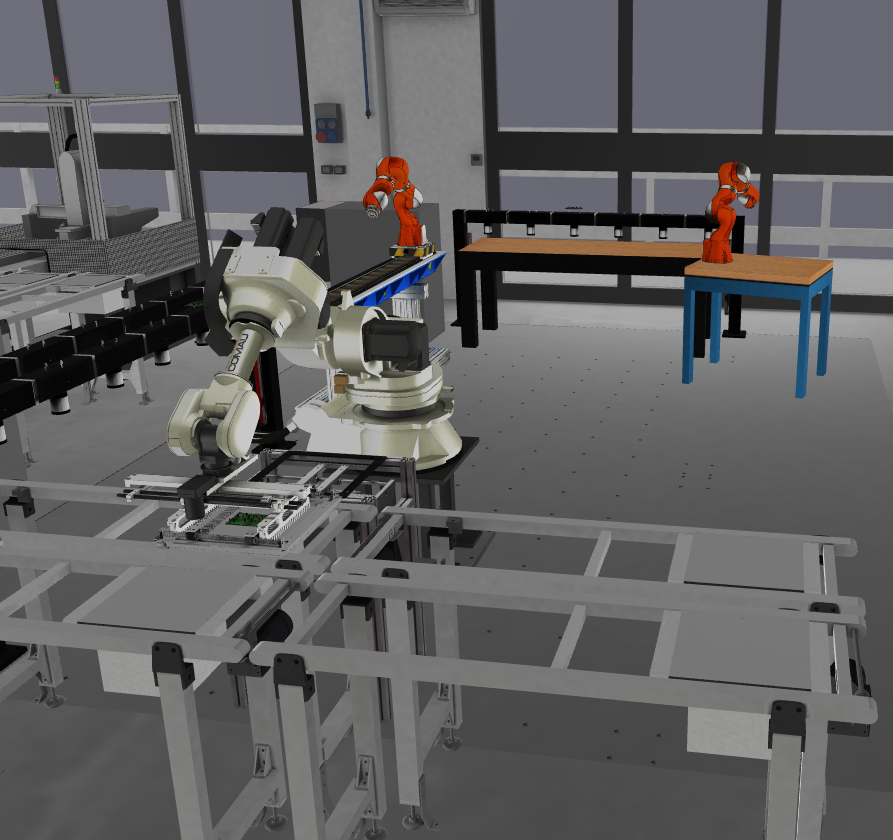
Figure 3: Screenshot of VEB.js application
3.3.2 React and Three.js
A valuable option for the implementation of web-based 3D and XR applications is the adoption of another webGL based framework such as Next.js. This is grounded on React library and allows the creation of full-stack web applications. In combination with the webXR based Three.js library dynamic and interactable 3D and augmented or virtual reality contents can be easily accessed from a compatible web browser therefore not dependent on any specific hardware. Also in this case it is possible to include 3D contents in compatible formats (such gLTF) and create a backend connection to communication protocols such as MQTT and ROS (Robot Operating System) which has been adopted in some of the joint calls and workshop activities (Figure 4).
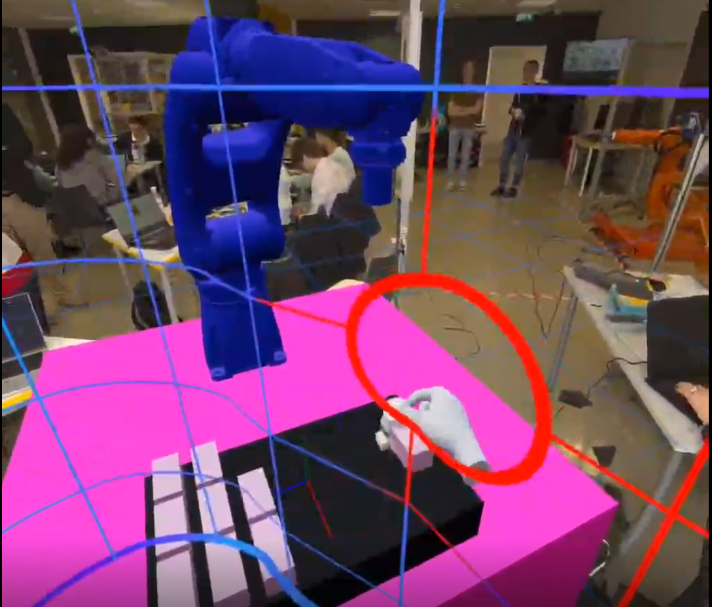
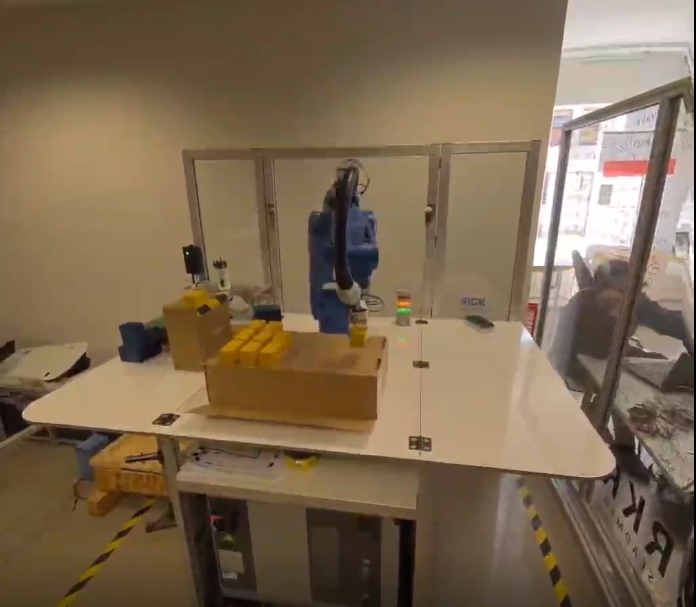
Figure 4: Screenshot of the proposed XR robot control interface and based on ROS, Next.js and Three.js.
References
-
Mahmood K, Otto T, Kuts V, Terkaj W, Modoni GE, Urgo M, Colombo G, Heidegger G, Kovacs P, Stahre P (2021) Advancement in production engineering education through Virtual Learning Factory Toolkit concept. Proceedings of the Estonian Academy of Sciences, 70(4):374–382.
-
Research and Markets. “Virtual Reality In Education Global Market Report 2023.” Accessed: June 4, 2023. Available online at: https://www.researchandmarkets.com/reports/5767510/virtual-reality-in-education-global-market-report (Author: Markets R., Year: 2023).
-
Hunicke R, LeBlanc M, Zubek R. “MDA: A formal approach to game design and game research.” In Proceedings of the AAAI Workshop on Challenges in Game AI, vol. 4, no. 1, pp. 17-22. San Jose, CA, 2004.
-
Winn B. “The design, play, and experience framework.” In Handbook of research on effective electronic gaming in education, pp. 1010-1024. IGI Global, 2009.
-
Urgo M, Terkaj W, Mondellini M, Colombo G (2022) Design of Serious Games in Engineering Education: an Application to the Configuration and Analysis of Manufacturing Systems, CIRP Journal of Manufacturing Science and Technology, Volume 36, 172-184.
-
Terkaj W, Urgo M, Kovács P, Tóth E, Mondellini M (2024) A framework for virtual learning in industrial engineering education: development of a reconfigurable virtual learning factory application. Virtual Reality, 28:148 doi:10.1007/s10055-024-01042-8
-
Biggs J, Tang C (2011) Teaching for Quality Learning at University
-
Anderson L, Bloom B, Krathwohl D, et al (2001) A Taxonomy for Learning, Teaching, and Assessing: A Revision of Bloom’s Taxonomy of Educational Objectives. Longman
-
Berardinucci F, Colombo G, Lorusso M, Manzini M, Terkaj W, Urgo M (2022) A learning workflow based on an integrated digital toolkit to support education in manufacturing system engineering. Journal of Manufacturing Systems, 63:411-423.